
🔒 Security Reminder: SecuX will never ask for your 24-word recovery phrase.
Looking for help?
Find answers to your questions
- Before you start
- Device Functions
- Firmware Update on Mobile
- Firmware Update via SecuX Mobile App
- Restore an Existing Wallet
- Safety Guide (Safety and Security Information)
- Setup a New Wallet
-
How to Connect
Send and Receive
Manage Coins & Tokens
DApps / Platforms
- Connect to MetaMask Using QR-based
- Send or Swap Crypto Using MetaMask
- WalletConnect for DApps
- Withdraw from Binance to SecuX on Mobile
- Withdraw from Coinbase to SecuX on Mobile
- Before You Start
- Beginner Safety Guide (Safety and Security Information)
- Set up a New V20 Wallet
-
Device Functions
- Device Functions
- Firmware Update on Mobile
- Firmware Update on Web
- Firmware Update via SecuX Mobile App
- Hidden Wallet
- Recovery Seed Phrase Check
- Buy Crypto on Coinify on Web
- Connect to MetaMask Using QR-based
- Send or Swap Crypto Using MetaMask
- WalletConnect for DApps
- Withdraw from Binance to SecuX on Mobile
- Withdraw from Binance to SecuX on Web
- Withdraw from Coinbase to SecuX on Mobile
- Withdraw from Coinbase to SecuX on Web
- Assign and Remove a FIO Crypto Handle
- FIO Request
- Register a FIO Crypto Handle
- Register a FIO Domain
- Renew a FIO Domain
- Send to a FIO Crypto Handle
- Stake FIO Token
- Ada Portal — WEB
- Manage EVM Chains
- Receive Funds on Web
- Receive on Mobile
- Send Funds on Mobile
- Send Funds on Web
- Send NFTs on Mobile App
- Send NFTs on Web
- Connect V20 to Computer via Bluetooth
- Connect V20 to Computer via USB
- Connect V20 to Mobile Device via Bluetooth
- Add Accounts on Mobile
- Add Accounts on Web
- Manage BEP-20 Tokens on Mobile
- Manage BEP-20 Tokens on Web
- Manage ERC-20 Tokens on Mobile
- Manage ERC-20 Tokens on Web
- Manage TRC-10/ 20 Tokens on Web
- Manage TRC-10/20 Tokens on Mobile
- Before You Start
- Beginner Safety Guide (Safety and Security Information)
- Set up a New W20 Wallet
-
Device Functions
- Device Functions
- Firmware Update on Mobile
- Firmware Update on Web
- Firmware Update via SecuX Mobile App
- Hidden Wallet
- Recovery Seed Phrase Check
- Buy Crypto on Coinify on Web
- Connect to MetaMask Using QR-based
- Send or Swap Crypto Using MetaMask
- WalletConnect for DApps
- Withdraw from Binance to SecuX on Mobile
- Withdraw from Binance to SecuX on Web
- Withdraw from Coinbase to SecuX on Mobile
- Withdraw from Coinbase to SecuX on Web
- Assign and Remove a FIO Crypto Handle
- FIO Request
- Register a FIO Crypto Handle
- Register a FIO Domain
- Renew a FIO Domain
- Send to a FIO Crypto Handle
- Stake FIO Token
- Ada Portal — WEB
- Manage EVM Chains
- Receive Funds on Web
- Receive on Mobile
- Send Funds on Mobile
- Send Funds on Web
- Send NFTs on Mobile App
- Send NFTs on Web
- Connect W20 to Computer via Bluetooth
- Connect W20 to Computer via USB
- Connect W20 to Mobile Device via Bluetooth
- Add Accounts on Mobile
- Add Accounts on Web
- Manage BEP-20 Tokens on Mobile
- Manage BEP-20 Tokens on Web
- Manage ERC-20 Tokens on Mobile
- Manage ERC-20 Tokens on Web
- Manage TRC-10/ 20 Tokens on Web
- Manage TRC-10/20 Tokens on Mobile
- Before You Start
- Beginner Safety Guide (Safety and Security Information)
- Set up a New W10 Wallet
-
Device Functions
DApps / Platforms
- Buy Crypto on Coinify on Web
- Withdraw from Binance to SecuX on Web
- Withdraw from Coinbase to SecuX on Web
- Assign and Remove a FIO Crypto Handle
- FIO Request
- Register a FIO Crypto Handle
- Register a FIO Domain
- Renew a FIO Domain
- Send to a FIO Crypto Handle
- Stake FIO Token
- Add Accounts on Web
- Manage BEP-20 Tokens on Web
- Manage ERC-20 Tokens on Web
- Manage TRC-10/ 20 Tokens on Web
- Create a New Wallet
- Device Setting
- Download App
- Safety Guide
-
DApps
NFTs
- Add to Favorites
- Display NFTs on Wallet
- Hide NFTs
- Manage NFT Gallery on SecuX Wallet App
- Receive NFTs
- Send NFTs
- Share NFTs
- View and Manage NFTs
- Add a New Wallet
- Connect / Disconnect Device
- Edit Wallet Name
- Firmware Check
- Remove Wallet
- Switch Wallet
- Blockchain Questions
- Crypto support
- Device Setup
- How SecuX’s NFT Wallet is Absolutely Changing NFT Storage Forever
- How to Store Shiba Inu Tokens in a SecuX Hardware Wallet
- Introducing SecuX’s Steel Crypto Wallet: The ‘X-Seed’
- Manage Solana (SOL) and Solana SPL tokens on SecuX V20, W20 and W10.
- Payment / Order / Shipment
- Security Questions
- SecuXess / SecuX Mobile App
- Send / Receive / Transactions
- Transaction / Network Fees
- USB / Bluetooth Connections
- Wallet and Device Issues
1. Getting Started
Table of Contents
Introduction
SecuX PUFido security key - Clife Key is the first FIDO security key with built-in PUF (Physically Unclonable Function) technology. In addition to being secure and easy to use, it is FIDO2 and U2F certified, providing enhanced protection for authentication security.
To get started with your PUFido key, please refer to these steps:
- Get to know your PUFido device and the platforms it supports.
- Create a PIN using a supported browser such as Google Chrome or Microsoft Edge.
- Choose a website or service that supports FIDO authentication.
- Register your PUFido Key with the selected account.
- Confirm the setup by signing in again on your desktop or mobile device.

PUFido Clife Key Features
• Advanced Security → Prevents phishing, password theft, and hacking attempts.
• Supports Both FIDO2 & U2F → Works for passwordless login (FIDO2) and two-factor authentication (U2F).
• Faster Login → No need to type passwords.
• Universal Site Compatibility → Google, Microsoft, Facebook, crypto exchanges, enterprise platforms, and more.
• Easy to Use → Just plug and log in.
Device overview
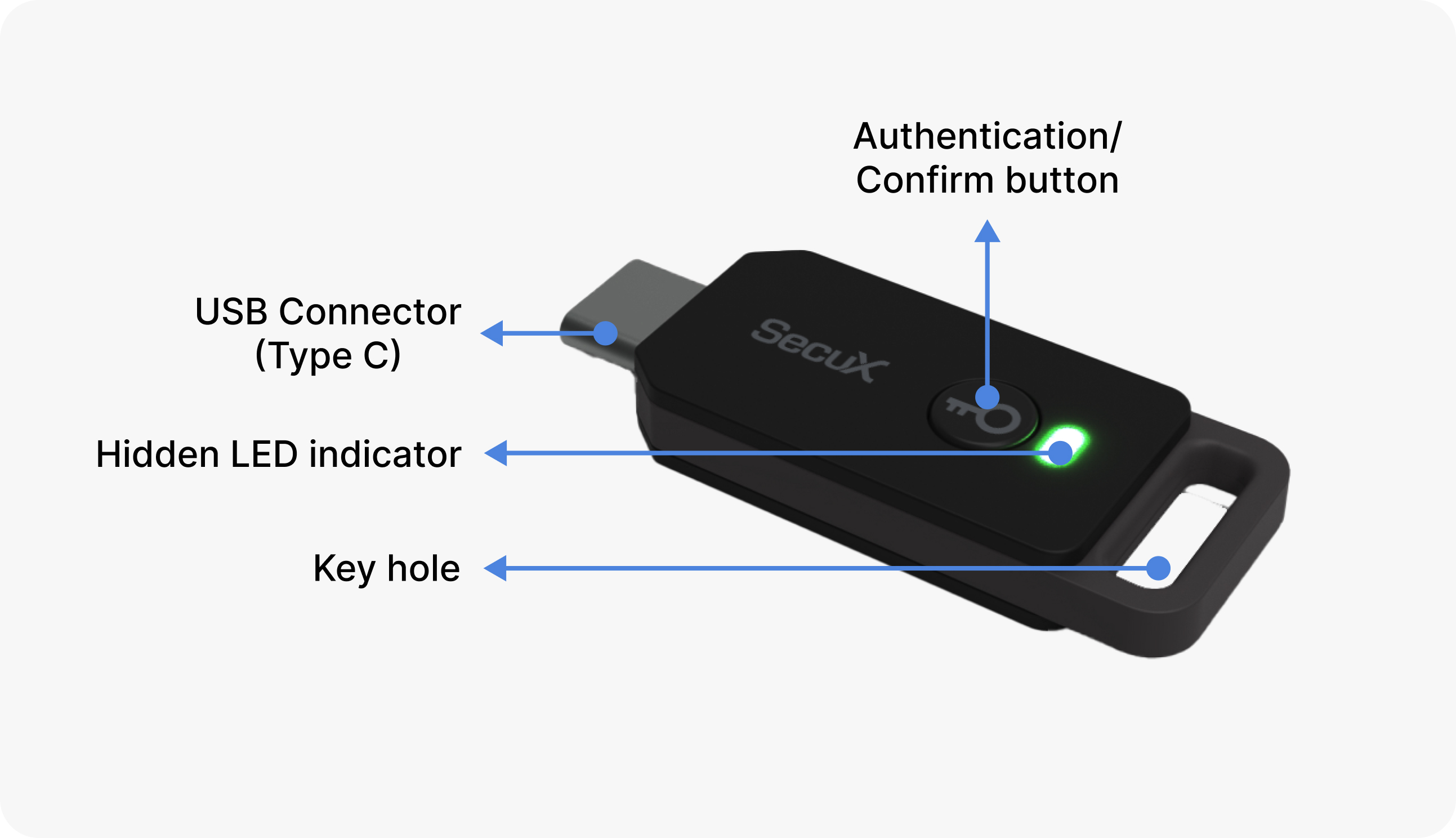
LED Status Indicator
| Status | LED display | Remark |
|---|---|---|
| Connect to USB port | Blinking 3 times if connection is successful. Otherwise the connection has failed. | Reinsert the key or change the USB port if no response on LED display. |
| Wait for authentication or confirmation | Blinks repeatedly | Press the button to authenticate or confirm. |
Host platform compatibility
| Device Platform | Type | Version | Description | Other Web Browsers |
|---|---|---|---|---|
| Windows 10 | OS | v.1809 or later | Windows 7, 8 are not supported | - |
| MacOS | OS | Mojave or later | - | - |
| Linux | OS | Latest version | 64-bit Ubuntu 14.04 or later, Debian 8 or later, openSUSE 13.3 or later, Fedora Linux 24 or later |
- |
| Android OS | OS | v.7 or later | Recommend to use the latest version | - |
| iOS | OS | v.16.3 or later | Recommend to use the latest version | - |
| Chrome | Web Browsers | Latest version | Latest version | Recommend to use the latest version |
| Edge | Web Browsers | Latest version | Latest version | Recommend to use the latest version |
| Firefox | Web Browsers | Latest version | Latest version | Recommend to use the latest version |
| Safari | Web Browsers | Latest version | Latest version | Recommend to use the latest version |
Updated on 28 Oct 2025
What are your Feelings?
Thanks for your feedback.
Get 10% OFF
Sign up for our newsletter to receive 10%OFF and more discounts and offers!